

Every device connected to the internet has an IP address. It is a unique string of numbers that websites, advertisers, and network administrators use to identify your approximate location and internet service provider. Most people never think about their IP. But if you use proxy servers, VPNs, or web scraping tools, verifying your IP address is no longer optional. It is how you confirm that your identity is actually hidden and that your proxy is routing traffic correctly.
Many tools promise to show your public IP, but few go deep enough to reveal hidden leaks. WebRTC can expose your real IP even when a proxy is active. DNS servers can betray your actual location. A mismatched timezone can tell a website that your browser and your IP do not belong together. Checking all these vectors is what separates a superficial IP lookup from a genuine anonymity audit.
That is where Whoer.net becomes essential. The Whoer IP checker examines your connection from multiple angles and assigns an anonymity score. This guide walks you through how to check an IP address with Whoer, how to interpret the results, and how UnoProxy residential proxies give you the cleanest possible profile.
What Makes Whoer.net Different from a Basic IP Checker
Type "what is my IP" into a search engine and you will get dozens of sites that display your public IP address and maybe your city. They stop there. Whoer.net goes much further. It acts as a full connection diagnostic tool that evaluates your anonymity setup, not just your IP.
When you land on whoer.net, the homepage immediately displays your IP address, country, city, and internet service provider. That is the surface level. Scroll down and you will see an anonymity score, a percentage that rates how well your real identity is concealed. A score of 100% means your connection shows no obvious signs of being proxied, leaked, or mismatched. Scores drop when Whoer detects inconsistencies.
Whoer checks several specific parameters:
- -WebRTC detection: WebRTC can leak your local IP address even if you have a proxy configured in your browser. Whoer flags this immediately.
- -DNS server location: The DNS server resolving your requests should be in the same country as your proxy IP. A mismatch suggests a DNS leak.
- -Flash and Java data: Though less common today, these older technologies can still expose identifying information.
- -Blacklist check: Whoer tells you if your IP address appears on common spam or proxy blacklists, a sign that websites may already block or distrust it.
- -Proxy detection: The tool attempts to classify your IP as residential, datacenter, mobile, or a known proxy exit node.
These checks answer the question "how can I check an IP address?" in a way that matters for anonymity, not just curiosity.
Step-by-Step: Checking Your IP with Whoer
Using the Whoer IP checker requires no installation and no account. The process is straightforward, but each step reveals something important.
Step 1: Visit whoer.net. The homepage loads with a large box showing your current public IP address, the country flag, and your ISP. This is the baseline. If you are not using any proxy, this information reflects your real location.
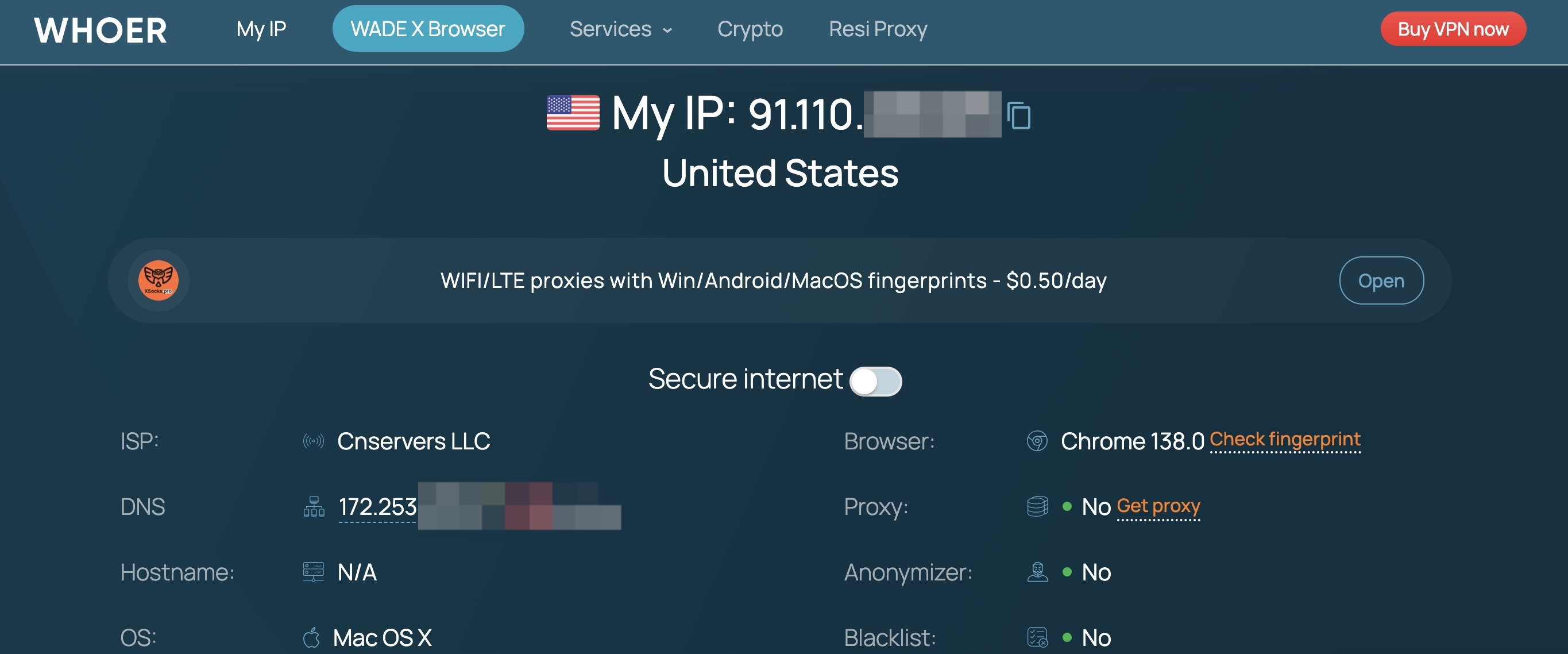
Step 2: Observe the anonymity score. Look at the percentage displayed near the top. If you are connecting from a home broadband line with no proxy, expect a score around 50% to 70%. Whoer knows residential ISPs, and a consistent setup earns a moderate score. A score of 0% to 30% typically indicates a flagged datacenter IP or multiple mismatches.
Step 3: Review the detailed check items. Below the score, Whoer lists each test parameter with a green checkmark or a red warning. Pay closest attention to WebRTC. If the WebRTC section shows an IP address that differs from your proxy IP, your browser is leaking your real location. DNS is the next critical item. The DNS IP should be in the same country as your proxy. A different country means your ISP's DNS server is still handling queries.
Step 4: Test with your proxy enabled. Configure your browser or operating system to use a proxy IP. This could be a browser extension, manual network settings, or a proxy manager. Once configured, refresh whoer.net. The displayed IP should now match your proxy IP's location. The ISP field should show a different provider than your own. The anonymity score should rise.
Step 5: Interpret the proxy detection result. Whoer will label your IP type. "Residential" is the ideal outcome. It means your proxy IP belongs to a real consumer internet connection and is treated as trustworthy by most web services. "Hosting" or "Datacenter" means the IP comes from a cloud provider and is easily flagged as a proxy. This distinction is vital for anyone who needs to avoid CAPTCHAs or IP bans.
Common Scenarios and What They Mean
Scenario: You are not using a proxy, and your score is 60%. This is normal. You are not anonymous, and Whoer correctly identifies your real IP and ISP. If you want to hide your identity, you need to route your traffic through a proxy.
Scenario: You enabled a proxy, but Whoer still shows your home IP in the WebRTC section. This is a WebRTC leak. Disable WebRTC in your browser settings. For Chrome, go to chrome://settings/content/webrtc. For Firefox, search about:config for media.peerconnection.enabled and set it to false. Refresh Whoer to confirm the leak is gone.
Scenario: You are using a datacenter proxy, and your anonymity score is 35%. Datacenter IPs are widely recognized as non-residential. Whoer flags them, and websites do the same. Switching to a residential proxy provider like UnoProxy immediately changes the IP classification to "Residential" and pushes the anonymity score above 90%.
Scenario: Your DNS server shows a different country than your proxy IP. This indicates that your DNS queries are bypassing the proxy. Using a proxy that supports SOCKS5 and configuring your browser to route DNS through the proxy solves this. UnoProxy's residential proxies support this configuration to maintain consistency across all checkpoints.
UnoProxy and Whoer: Achieving a Near-Perfect Anonymity Score
Once you know how to check an IP address with Whoer, the next logical step is to achieve the highest anonymity score possible. A high score matters because it means websites, streaming platforms, and anti-bot systems will treat your connection as legitimate.
UnoProxy provides residential proxies sourced from real internet service providers. When you connect through an UnoProxy IP and visit Whoer, the checker sees a genuine home broadband connection. The IP type shows "Residential" rather than "Hosting." The DNS location aligns with the proxy location. The ISP listed is a recognized consumer carrier, not a cloud hosting company. All of these factors push the anonymity score into the 90% to 100% range.
This is not an abstract metric. A high Whoer score means your web scraping scripts will face fewer CAPTCHAs. It means your YouTube proxy will not trigger location errors. It means the websites you visit cannot easily distinguish your traffic from an ordinary local visitor. UnoProxy's residential IPs carry a trust score that datacenter IPs simply cannot match.
The proof is in the test. Start UnoProxy's free trial, configure your browser with the residential proxy credentials, and open whoer.net. Compare the anonymity score to what you saw with your previous setup. The difference is immediate and measurable.
How to Combine UnoProxy with Whoer for Ongoing Monitoring
Smart proxy users do not test their setup once and forget about it. IP addresses rotate, browser configurations change, and software updates can re-enable features like WebRTC that you had previously disabled. Periodic checks with the Whoer IP checker keep your anonymity intact.
Develop a habit of visiting whoer.net each time you start a new session that requires location masking. Confirm that the IP matches your target country, that WebRTC shows no leak, and that the anonymity score remains high. If anything looks off, disconnect and check your proxy settings before proceeding. UnoProxy's residential pool stays consistently clean, so the variable is almost always a local configuration issue.
For users managing multiple proxy sessions, such as marketers or SEO analysts checking region-specific search results, this verification step is especially critical. A single misconfigured session can expose your real IP and undermine your data collection. UnoProxy's dashboard simplifies credential management, making it easy to assign dedicated IPs to different tasks and verify each one with Whoer.
FAQ
How can I check an IP address anonymously?
Use a tool like whoer.net. It shows your public IP and checks for identity leaks like WebRTC or DNS mismatches. For anonymous testing, connect through a residential proxy first.
What is a Whoer IP checker?
The Whoer IP checker is an advanced online tool that displays your IP address and evaluates your anonymity by checking for leaks, blacklists, proxy detection, and browser fingerprinting.
Why does my Whoer anonymity score matter?
A higher score means your real identity is better concealed. Websites and anti-bot systems are less likely to block or challenge a connection with a high Whoer score.
Can Whoer detect a proxy?
Yes. Whoer classifies IPs as residential, datacenter, or mobile. Residential IPs like those from UnoProxy are more trusted and achieve higher scores.
How can UnoProxy improve my Whoer score?
UnoProxy provides clean residential IPs that Whoer recognizes as legitimate home connections. When used with proper WebRTC and DNS settings, these proxies achieve anonymity scores above 90%.
