

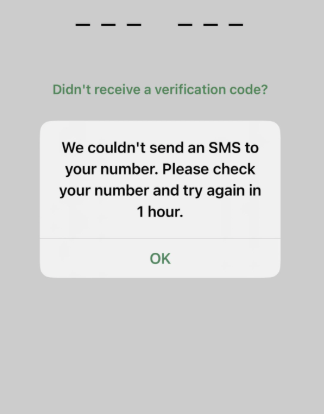
There are few things as frustrating as staring at your phone, waiting for a crucial 6-digit code that never arrives. If you've found yourself searching "whatsapp cannot receive verification code" or "Why am I not getting the 6 digit code from WhatsApp?", you're not alone. This is a common hurdle, but it's one you can almost always overcome.
This guide goes beyond basic troubleshooting lists. We’ll explore the root causes, provide clear, actionable solutions, and answer the critical question: How do I fix not receiving verification code? Let’s restore your access to WhatsApp.
Understanding the "Why": Common Reasons for the Missing Code
Before we dive into the fixes, it's helpful to understand what's happening behind the scenes. Asking "Why can't WhatsApp send a verification code to my number?" is the first step. The issue typically falls into one of these categories:
1. Network Connectivity: A weak or unstable mobile or Wi-Fi signal is the most common culprit. The SMS might be delayed or fail to deliver entirely. Or you can try the proxy, like UnoProxy, to change the network for the regions that WhatsApp supports.

2. Carrier or SMS Filtering: Your mobile carrier might be mistakenly flagging the automated WhatsApp SMS as spam. Additionally, your phone's native messaging app might have a "spam" or "unknown sender" filter that is trapping the code.
3. Incorrect Phone Number: A simple typo when entering your country code or phone number during verification will send the code into the void.
4. Software Glitches: Temporary bugs in the WhatsApp app, your phone's operating system, or the messaging service can interrupt the process.
5. Security & Privacy Apps: VPNs, call-blocking apps, and privacy services can interfere with the standard SMS reception pathway.
6. Server-Side Delays: In rare cases, high global traffic on WhatsApp's servers can cause minor delays in sending verification SMSes.
A Step-by-Step Action Plan to Regain Access
Instead of trying everything at random, follow this logical progression of solutions, from the simplest to the more advanced.
Step 1: The Immediate Checks (5-Minute Fixes)
- -Double-Check Your Number: This seems obvious, but it's the number one cause. Ensure you’ve entered your full number with the correct country code (e.g., +1 for the US, +44 for the UK), without any leading zeros.
- -Ensure a Stable Connection: You need a reliable internet connection (Wi-Fi or mobile data) to initiate the verification request. Switch between Wi-Fi and mobile data to see if one is more stable. If you're on a 5G network with a spotty signal, try forcing your phone to use 4G/LTE, which can sometimes be more reliable for SMS.
- -Wait and Use the "Call Me" Option: After the SMS fails to arrive, WhatsApp will offer a "Call me" option. This will trigger an automated voice call that will recite the 6-digit code. This often works even when the SMS doesn't.
- -The Classic Restart: Power off your phone completely and turn it back on. This clears temporary system glitches that can block incoming SMS.
Step 2: Intermediate Troubleshooting
If the basics don't work, it's time to look a little deeper.
- -Inspect Your Message Settings (Crucial for iPhones): On iPhone, go to Settings > Messages and disable "Filter Unknown Senders." This feature often mistakenly filters verification codes. On Android, check your messaging app's settings for a "Spam" or "Blocked" folder.
- -Disable VPNs and Privacy Apps: If you use a VPN or an app like a call blocker, disable it completely and try requesting the code again. These services can reroute or block automated SMS.
- -Clear Cache (Android Specific): Go to your phone's Settings > Apps > WhatsApp > Storage and tap "Clear Cache." This won't delete your personal data but can resolve app corruption causing the verification loop.
- -Check for System Updates: An outdated operating system can cause compatibility issues. Go to your phone's system settings and check for any available updates.
Step 3: Advanced Solutions for Stubborn Problems
When you've tried everything else, these are your next steps.
- -The Nuclear Option: Reinstall WhatsApp: Uninstall WhatsApp, restart your phone, and then reinstall it from the official app store. This provides a completely fresh start. Note: If you weren't able to verify and set up the app, you will not lose any existing chat history, as it hasn't been restored yet.
- -Contact Your Mobile Carrier: It's possible your carrier is blocking short-code SMS messages. Call their customer service and ask if they are blocking messages from WhatsApp or other verification services.
- -The Email Verification Method: A Key AlternativeMany users don't realize you can resend whatsapp verification code by email. This is a powerful workaround.In the WhatsApp verification screen, tap the three-dots (menu) or "Need Help?".Select "Send via email" or a similar option.Ensure the email address shown is one you have access to.Check your email inbox (and spam folder) for the code.While this doesn't let you get whatsapp verification code online in a public sense, it redirects it to your private email, bypassing SMS issues entirely.
Addressing Common Concerns and Misconceptions
- -"Can I get my WhatsApp verification code online from a website?"No. Any website or service claiming to how to get whatsapp verification code online for you is a scam. WhatsApp codes are sent directly to your registered phone number or linked email address for security. Never share your code with anyone.
- -"I'm traveling. Why won't it work?"If you've inserted a local SIM card while abroad, your number has changed, so you can't receive SMS for your original number. If you're using an international roaming plan, SMS delivery can be delayed. Using the "Call Me" or email option is your best bet in this scenario.
When All Else Fails: Contacting WhatsApp Support
If you have exhausted all options, you can contact WhatsApp directly through the app. Go to Settings > Help > Contact Us and describe your issue in detail. While they don't offer live support, they can investigate persistent, widespread issues.
Final Thoughts
Not receiving your WhatsApp verification code is a temporary roadblock, not a dead end. By systematically working through these solutions—starting with your network and number, moving to app and OS settings, and finally leveraging the email option—you will almost certainly resolve the issue. The key is patience and a methodical approach. Regain your access and get back to connecting with the people who matter.
