

Most people who use a proxy are hiding their own IP. That makes sense. You send your traffic through a forward proxy, and the website sees the proxy instead of you.
But what if you run a website and want to hide your servers?
That is where a reverse proxy enters the picture.
A reverse proxy sits in front of your web servers, not in front of your users. Every request to your website hits the reverse proxy first. The proxy then decides which backend server should handle that request. The user never knows which server responded.
If you manage any web service that faces the internet, you need to understand reverse proxies. They are not optional for high traffic sites.
Reverse Proxy vs Forward Proxy
Let us compare the two because people confuse them constantly.
A forward proxy hides the client. You use it to protect your identity or bypass restrictions.
A reverse proxy hides the server. You use it to protect your infrastructure and distribute traffic.
Forward proxies help you go out to the internet. Reverse proxies help the internet come in to you.
Once you see that difference, the rest becomes clear.
How a Reverse Proxy Works
Here is the flow.
A user visits yourwebsite.com. That request goes to the reverse proxy. The reverse proxy checks which backend server is least busy. It forwards the request to that server. The server processes the request and sends the response back to the reverse proxy. The reverse proxy sends the response to the user.
The user never sees your origin server’s IP address. That is the whole point.
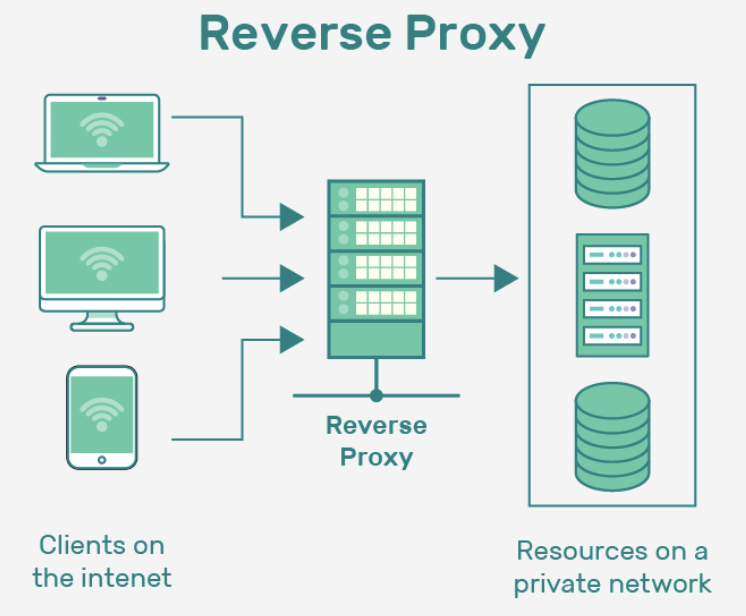
Four Core Benefits of a Reverse Proxy
Load balancing
If you have one web server and traffic spikes, that server can fail. A reverse proxy distributes requests across multiple servers. No single server gets crushed.
Security
Your origin server’s IP stays hidden. Direct attacks become much harder. Many reverse proxies also filter malicious requests before they reach your backend.
SSL termination
Handling HTTPS encryption on every backend server is inefficient. A reverse proxy can manage SSL once and pass unencrypted traffic internally.
Caching
Static responses like images, CSS, or API replies can be stored at the proxy level. The next request gets an instant response without touching your backend.
Real World Examples You Already Use
Every major CDN like Cloudflare runs on reverse proxies. Large e commerce sites use them to survive Black Friday traffic. API providers use them for rate limiting, authentication, and logging.
If you run a web service and you do not use a reverse proxy yet, you will eventually.
Does This Relate to UnoProxy?
UnoProxy focuses on forward proxies for data collection, not reverse proxies for server protection. But understanding both sides of the proxy world helps you make better infrastructure decisions.
If your goal is to protect your own servers, look at reverse proxies and CDNs.
If your goal is to collect public data at scale without getting blocked, you need what UnoProxy provides. Residential rotating proxies. High success rates. Global coverage.
Try UnoProxy for Data Collection
UnoProxy gives you more than 10 million residential IPs with automatic rotation. No blocks. No CAPTCHAs. Just clean, reliable data access.
Start your free trial and power your web scraping with UnoProxy.
FAQ
1. Is a reverse proxy the same as a load balancer?
Not exactly. A load balancer distributes traffic across servers. A reverse proxy can do that, but it also handles SSL termination, caching, and security filtering. A reverse proxy is a more complete tool.
2. Do I need a reverse proxy for a small website?
For a simple blog or a low traffic site, you probably do not. As soon as you run multiple backend servers or need SSL management and security hardening, a reverse proxy becomes valuable.
3. Can a reverse proxy hide my origin server IP completely?
Yes, if configured correctly. All external traffic goes through the reverse proxy. Your origin server only communicates with the proxy, not with end users. This makes direct attacks much harder.
